
Write the scene. Paintbrush films it.
Paintbrush is an AI video maker for stories. Paste a passage or a whole script, and it casts the characters, keeps them looking the same in every shot, and gives each one a voice that’s acted and lip-synced.
Pip, a small grey alien with oversized eyes and worn boots, walked ahead across the red flats. Behind him Commander Reyes followed in a white EVA suit, sample case in hand, dust trailing behind them both.
 Pipcharacter
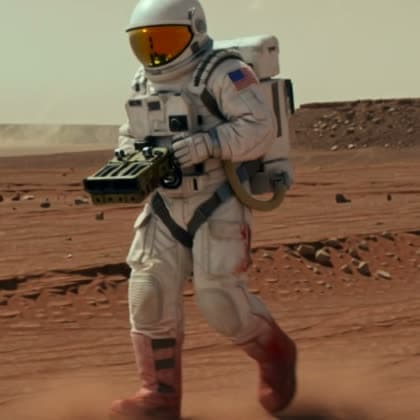 Cmdr. Reyescharacter
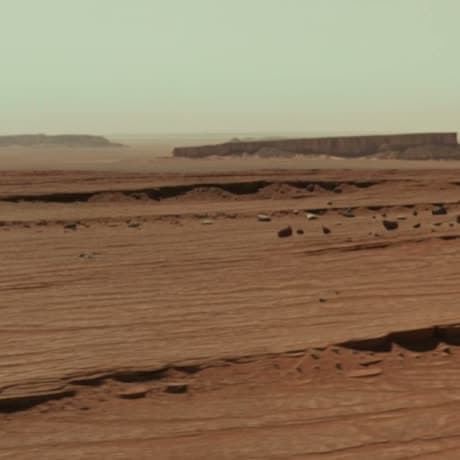 Martian Flatssetting
The same character in every shot
Paintbrush designs each character once: a front view, a side profile, a back view, and a written description. Every scene that mentions them is generated from those references, so faces, outfits, and colors hold from the first shot to the last.
- Settings get a reference image too, so locations stay put between shots
- One art style for the whole project: anime, realistic, cartoon, watercolor, pixel art, and more
- Need a variant, like an older version or a new outfit? Copy the character and describe only the change
- Start a character from your own reference image
1The Long Walk
@Cmdr. Reyes trudges across @Martian Flats, the dead rover shrinking behind him.
2First Contact
@Pip steps out of the dust and waves. @Cmdr. Reyes freezes, sample case raised.
3Follow Me
@Pip leads @Cmdr. Reyes toward the third mesa, glancing back to check he’s still there.
Lip sync for every character who speaks
Write dialogue in quotes and assign each line to a character. Paintbrush voices every line, then lip-syncs each on-screen line to the face of the character who says it, one line at a time.
- Any number of characters can talk in one scene, each synced to their own face
- Narration and offscreen lines stay off-camera, so nobody mouths words they aren’t saying
- The shot is timed to the speech, so a line is never cut off mid-sentence
- Long conversations split into scenes that continue from the last frame
Reyes heard footsteps in the dust behind him.
“Slow down, Pip.”
“You walk like the ground is hot.”
Voice acting, not just text-to-speech
Every character speaks in their own ElevenLabs voice. Put a delivery tag inside a line, from [whispers] to [starting calm, then losing patience], and the voice performs it instead of reading it. The same tag tells the video how to act the line, so the face matches the sound.
- Thousands of ElevenLabs voices made for acting and narration, searchable, each with a preview
- The agent tags every line, adding a new tag where the feeling turns
- Natural pauses between speakers, and shorter ones when the same voice continues
- Shots leave room after a line for a pause or a reaction
“[sighs]I know. The rover’s not coming back.”
- Voice
- Performs the line through a sigh
- Video
- Reyes sighs as he says it, shoulders dropping, lip-synced
“[whispers]Then walk where I walk.”
- Voice
- Drops to a whisper
- Video
- Pip leans in and whispers the line, lip-synced
The agent does the setup. You make the calls.
It lives inside the editor, so everything it creates is yours to change by hand.
1.Paste a story or describe a scene
A paragraph, a script, a Reddit post, or one line. The agent works out who is in it, where it happens, and how it breaks into shots.
2.Review previews, then approve
Characters and settings are previewed first. You see the scene description and a credit estimate before any video is generated.
3.Direct with follow-ups
Add a line of dialogue, extend a shot, or change the style. The agent updates the plan and regenerates only what changed.
Narrator
Characters
Settings
No scenes yet
A scripted walkthrough of the editor. The clip and stills are real Paintbrush output.
Have a full script? Paste it in.
Paste a whole story, screenplay, or Reddit post, up to 50,000 characters, into the creation agent. It plans the cast, settings, and shots, shows you previews and a credit estimate, and generates no video until you approve.
- Cast, settings, and chapters planned from the text, up to 12 chapters per plan
- Characters and settings already in the project are reused instead of duplicated
- Every line assigned to its speaker, narration for the rest, voices from the ElevenLabs Voice Library
- Longer stories continue part by part with the same cast and settings
- Every scene stays editable in the scene editor
“The rover had died two klicks back. Reyes walked. Somewhere past the third mesa, something small and grey stepped out of the dust and waved…”
I’ve planned this as three shots with Reyes, Pip, and the Martian flats. Here are the previews and the scene list before I generate any video.
- 1The Long Walk5s
- 2First Contact8s
- 3Follow Me6s
3 scene media jobs · approximately 613 credits
Full control when you want it
Everything the agent does, you can also do by hand in the same editor.
- Creation agent
- Plans the cast and scenes, shows previews first, and generates video only after you approve.
- Shots up to 30 seconds
- Each shot is sized to its lines, from 4 to 30 seconds, with voices and mouths generated together.
- @Mentions
- Reference characters and settings by name in any scene description.
- Tweak and continue
- Edit a finished clip with a prompt; each new shot picks up from the previous shot's last frame.
- Art styles
- Anime, realistic, cartoon, watercolor, pixel art, and more, applied to the whole project.
- Vertical or widescreen
- 16:9, 4:3, 3:4, or 9:16 for TikTok, Reels, and Shorts.
- Edit the cut
- Trim clips, split or merge shots, or move a cut between lines without losing the scenes you generated.
- Export
- Download the finished project as a single video with every voice mixed in.
Questions people ask
What is Paintbrush?
Paintbrush is an AI video maker for stories. You paste a passage, a script, or a whole story, and its creation agent builds the characters, settings, and scenes, then generates video with consistent characters, lip-synced dialogue, and voice acting. Everything it makes stays editable in a scene-by-scene editor.
How do I keep AI characters consistent across scenes?
Paintbrush designs each character once as a front view, a side profile, a back view, and a written description. Every scene that @mentions the character is generated from those references, so the face, outfit, and colors stay the same in every shot. Settings get reference images too, and the art style is set once for the whole project.
Can multiple characters talk in the same AI video with lip sync?
Yes. Write dialogue in quotes and assign each line to a character. Paintbrush generates each line in that character's voice and lip-syncs every on-screen line to the face of the character who says it, one line at a time. Narration and offscreen lines are left as voice-over, so no one mouths words they aren't saying.
Can I control emotion and delivery in AI voices?
Yes. Put a delivery tag inside a line, such as [whispers], [sighs] or [like a sports commentator, speeding up], and the ElevenLabs voice performs it rather than speaking the tag. The same tag is passed to the video as an acting cue for that line. The creation agent tags every line automatically, adding a new tag where the feeling turns.
Which voices are available?
Paintbrush lets you search the ElevenLabs Voice Library: thousands of professional voices made for character acting, and storytellers for narration, filterable by gender, age and accent, each with a preview you can play before choosing. Each character gets their own voice, and each project has a separate narrator voice for the text between quotes.
Can I turn a short story, script, or Reddit post into a video?
Yes. Paste it into the creation agent, up to 50,000 characters. The agent plans the characters, settings, and chapters, assigns every line to its speaker, and reuses characters and settings you already have. You approve the character and setting previews, the chapters' audio, and the shots, each with a credit estimate, before any video is generated. One plan covers up to 12 chapters; for a longer story the agent makes the first part, then offers to continue with the same cast. Every scene stays editable afterward.
How long can videos be, and can I make vertical videos?
Each scene is 4 to 30 seconds, sized to its slice of the chapter's audio, and longer dialogue splits into scenes that continue from the last frame. Projects can be 16:9, 4:3, 3:4, or vertical 9:16 for TikTok, Reels, and Shorts, and export as a single video.
How does pricing work?
Paintbrush uses credits. Agent chat uses credits, and video is the main cost: the agent shows character and setting previews plus a credit estimate, and generates video only after you approve. For example, a 5-second scene with on-camera dialogue is about 152 credits, or 164 for a silent one.
Start with a paragraph you’ve already written.
Paste it in and see it as a scene. You’ll see previews and a credit estimate before any video is generated.